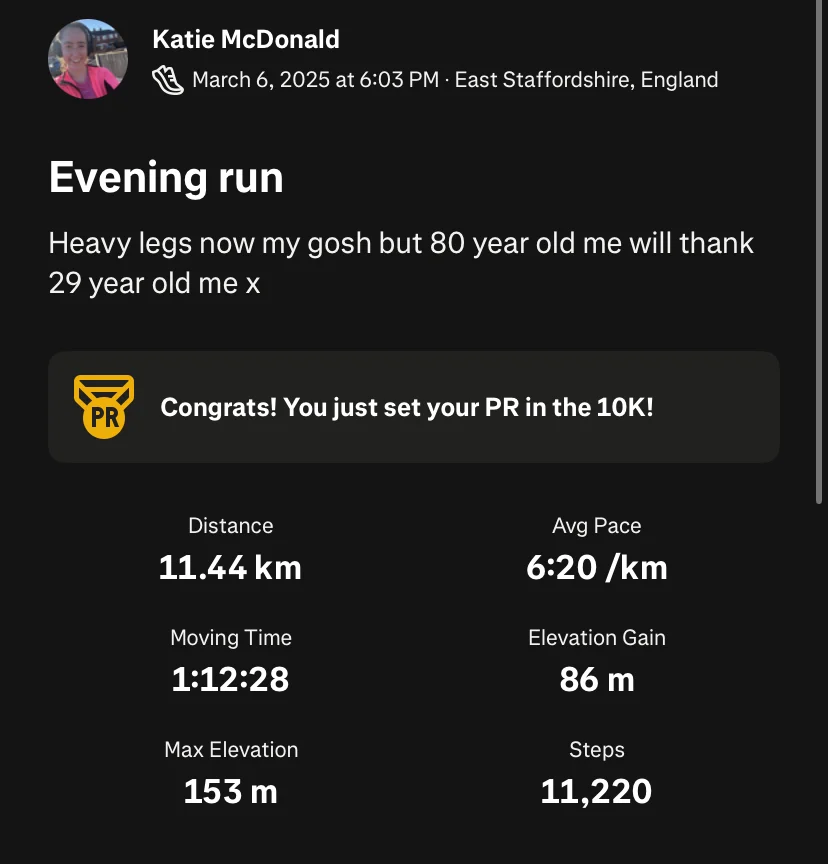
I put off downloading Strava for ages. I’d been using Runkeeper since 2016 — tracked 366 miles on it, done two half marathons with it, felt perfectly happy with it. Why would I switch?
And then I switched to Strava in 2025 and honestly wondered why I’d waited so long.
If you’re new to running and keep hearing people mention Strava, or you’ve downloaded it and aren’t quite sure what you’re doing yet — this is the guide I wish I’d had. I’m going to walk you through everything: what Strava actually is, whether it’s free, what the paid version gets you, how to connect your watch, and all the little things that take a minute to figure out when you’re starting out.
No jargon. No complicated stuff. Just one runner telling another how it works.
Table of Contents
- What is Strava?
- Is Strava free?
- How much is Strava premium?
- Is Strava premium worth it?
- How to use Strava as a beginner runner
- How to change km to miles on Strava
- How to connect Garmin to Strava
- How to connect Fitbit to Strava
- How to create a segment on Strava
- Is Strava down?
- How to cancel your Strava subscription
- How to delete your Strava account
- My verdict
What is Strava?
Strava is a free running and cycling tracking app. You open it, press start, go for your run, press stop, and it records your route, distance, pace, and time using your phone’s GPS. Then it saves it all so you can look back at your runs over time and see how you’re progressing.
But it’s more than just a tracker. The bit that makes Strava different from most running apps is the social side. You follow other runners, they follow you, and when you post a run you can give each other “kudos” — basically a thumbs up or well done. It sounds simple, and it is, but genuinely? Knowing someone might see your run and give you kudos is quietly motivating.
I’ve made a little explainer on my TikTok breaking down exactly what Strava is and how it works if you’d rather watch than read
@misskatieruns How to use Strava for beginner running – in 60 seconds! I’ve been using the running app Strava now for a few months so I’ve put together a tutorial on how to use Strava for runners. I’ll show you exactly how to record a run on Strava and how to save it and see your running progress. Let me know if you have any questions about @strava as a running app – save this Strava tutorial if you found it helpful! #runningapp #strava #stravatutorial #runningapps
.
Is Strava free?
Yes — Strava has a completely free version and it’s genuinely good, especially when you’re just starting out. Here’s a video explaining.
@misskatieruns Is Strava free? Let me show you what you can do for free on Strava the running app And then I’ll break down how much Strava costs and the different options for family / students etc. Follow for more tips on how to use Strava for beginner runners
The free version gives you GPS tracking, route maps, pace and distance data, your activity history, and the social feed where you can follow other runners and give kudos. For most beginners, that’s everything you actually need.
There is a paid subscription tier (more on that in a second) but you will not be hassled into it constantly, and you don’t need it to get real value from the app. I’d always say try the free version first and see how you get on before you think about upgrading.
How much is Strava premium?
Strava’s paid tier — it used to be called Strava Premium but is now just called a Strava Subscription — currently costs:
In the UK:
- £8.99 per month
- £54.99 per year (saving you about £53 versus paying monthly)
In the US:
- $11.99 per month
- $79.99 per year
There’s also a Strava + Runna plan in the US at $149.99/year if you want Runna’s training plans bundled in, and a family plan at $139.99/year for up to five people.
Worth knowing: Strava offers a discounted subscription for students, teachers, military personnel, and medical professionals — worth checking if any of those apply to you. There’s also usually a free trial available so you can test the paid features before committing.
Prices are occasionally updated, so always check Strava’s official pricing page for the most current rates in your region.
It’s worth noting that Strava did put their prices up fairly significantly a couple of years ago, which caused quite a stir in the running community. The monthly UK price went from £6.99 to £8.99, which is a noticeable jump. It prompted a lot of runners to switch to paying annually instead — and honestly, if you’re going to subscribe, the annual plan is much better value.
Is Strava premium worth it?
Honest answer: for beginner runners, probably not yet.
The free version of Strava does everything you need when you’re getting started. You can track your runs, see your progress over time, follow friends, and get that lovely little hit of kudos after a good run. None of that costs anything.
The paid subscription unlocks things like route planning, live segments (where you can race your own previous times on specific stretches of road), more detailed training analysis, and — as of recently — some AI-powered training insights. These are genuinely useful features, but they’re more relevant once you’ve been running for a while and are looking to improve rather than just get started.
Where I think the subscription earns its keep is if you’re training for a race, you’re running regularly (a few times a week), and you want the deeper data and the route-building tools. At that point, £54.99 a year works out at about £1.05 a week — and if running is your main hobby, that’s not a lot.
But if you’re new? Start free. There’s absolutely no rush.
You can see exactly what the subscription includes versus the free version on Strava’s subscription page.
How to use Strava as a beginner runner
Getting started on Strava is genuinely straightforward — I promise it’s not as complicated as it might look when you first open it.
Download the app from the App Store or Google Play — it’s free and takes about a minute.
Set up your account. You can sign up with an email address, or link it to an existing Google or Facebook account.
Set your sport. When you start a new activity, make sure you select “Run” rather than the default (which might be Ride). You can set running as your default sport in your profile settings.
Start a run. Hit the orange record button, select Run, wait for the GPS to lock (you’ll see it searching — give it 30 seconds outside), and off you go. When you finish, hit stop and save.
Check your activity. Once saved, you’ll see your map, your pace, your distance, and your time. That’s your run logged.
Follow people. Search for friends, local runners, or anyone you want to follow. Their runs will show up in your feed, you can give them kudos, and they can do the same for you.
That’s genuinely all you need to get going. Everything else you can discover as you go.
How to change km to miles on Strava
This is one of the most common little niggles when you first set Strava up — it defaults to kilometres, and if you think in miles (very British of you) it can feel a bit confusing.
I’ve made a quick TikTok showing exactly how to do this —
@misskatieruns How to change kilometres to miles on Strava let me show you in this Strava tutorial
. But here’s how:
On the app:
- Tap your profile photo (top left)
- Tap the settings cog (top right)
- Scroll to Units of Measurement
- Switch from Kilometres to Miles
On the website:
- Hover over your profile photo
- Go to Settings
- Select Display Preferences
- Change the measurement units to Miles
Done! All your previous and future runs will now show in miles.
How to connect Garmin to Strava
Good news: once you set this up, it’s automatic. Every run you do on your Garmin watch will sync straight to Strava without you having to do anything.
Here’s how to connect them:
- Open Strava and go to your profile
- Tap Settings then Connected Apps (on the app) or go to Settings > My Gear > Connect a Device on the website
- Find Garmin Connect in the list
- Tap Connect — you’ll be taken to Garmin’s login page
- Log into your Garmin account and authorise the connection
- That’s it — your Garmin runs will now sync to Strava automatically
If you run into any issues, Garmin and Strava both have help pages: Strava’s connected apps help walks you through it step by step.
How to connect Fitbit to Strava
Fitbit works slightly differently to Garmin — you connect it through the Fitbit app rather than through Strava directly.
Here’s how:
- Open the Fitbit app on your phone
- Tap your profile photo then tap your device
- Scroll down and tap Apps
- Search for Strava and install it
- Follow the prompts to link your Strava account
Once connected, your Fitbit runs should sync across to Strava automatically.
One thing to know: the integration between Fitbit and Strava has had its moments over the years — if it’s not syncing properly, Strava’s help centre has troubleshooting steps that usually sort it.
How to create a segment on Strava
Segments are one of the features that make Strava a bit addictive, honestly.
A segment is a specific stretch of road or trail that’s been marked out — and every time you run over it, Strava records your time and ranks you on a leaderboard against everyone else who’s ever run the same stretch. So you might find there’s a segment on your regular running route without even knowing it, and suddenly you’re competitive about a hill you never cared about before.
Creating your own segment is a paid (subscription) feature. But you can use and compete on existing segments for free.
To create a segment (subscribers only):
- Go to strava.com on a desktop browser
- Open an activity that includes the stretch of road you want to make into a segment
- Click Create Segment on the activity page
- Use the slider to mark the start and end points
- Name your segment and save it
Strava has a full guide to segments on their support page if you want to go deeper on how they work.
Is Strava down?
It does happen occasionally — and when it does, the app can feel a bit broken or your runs might not upload properly.
Before you assume something’s wrong with your phone or your account, the quickest thing to do is check Strava’s status page which shows any known outages or issues in real time.
If everything looks fine on their end and you’re still having trouble, Strava’s support centre is the best place to go.
How to cancel your Strava subscription
If you’ve tried the subscription and decided it’s not for you — no judgement! — here’s how to cancel.
If you subscribed through iOS: Go to your iPhone Settings > Apple ID > Subscriptions > Strava > Cancel Subscription
If you subscribed through Android: Go to Google Play > tap your profile photo > Payments & Subscriptions > Subscriptions > Strava > Cancel
If you subscribed through the Strava website: Go to strava.com > Settings > My Account > Subscription and follow the cancellation steps from there
You’ll keep your subscription features until the end of your current billing period. Strava has a full cancellation guide if you need more detail.
How to delete your Strava account
Deleting your account is different to cancelling a subscription — it permanently removes your profile and all your activity data, so it’s worth being sure before you do it.
- Go to strava.com on a desktop browser (you can’t do this in the app)
- Hover over your profile photo and go to Settings
- Scroll to the bottom of the My Account page
- Click Delete Your Account and follow the steps
Strava gives you a chance to download all your data first, which I’d definitely recommend doing before you delete anything. Their account deletion help page has the full instructions.
My verdict
I genuinely wish I’d switched to Strava sooner.
I used Runkeeper for nearly a decade and it served me well — but Strava just feels more alive. There’s something about the community element, seeing your friends’ runs, getting a little kudos notification after you’ve been out — it keeps you going in a way that a solo tracker doesn’t quite manage.
For beginner runners, my advice is this: download the free version, get comfortable with it, and don’t even think about the paid subscription for a while. The free tier is brilliant and does everything you need. If you find yourself running regularly and wanting more from the app — route planning, deeper data, live segments — then it’s worth considering. At £54.99 a year it’s not nothing, but if running is your main hobby, it works out at roughly the cost of a coffee a week.
The km to miles thing threw me off at first, the Garmin connection took me a minute to find, and I spent longer than I’d like to admit not knowing what segments were. So hopefully this guide saves you a bit of that confusion.
If you’ve got questions, find me on Instagram or come and follow along on TikTok @misskatieruns — I post loads of honest, no-fuss running content over there.
Happy running. 🏃♀️
Written by Katie McDonald, 24th May 2026
Instagram | Strava | Facebook | X (formerly Twitter) | LinkedIn
